
I have been running models with Ollama and vLLM. Then I stopped to ask: what is actually happening behind that API call?
A learning chat turned into these notes. Let’s follow one request all the way through:
Why did my Kubernetes pod restart? The container’s last termination reason is OOMKilled.
This is an illustrative example, not a live diagnosis. We will use a hypothetical 2B model throughout.
Part 1: The Mechanics#
1. An answer grows one token at a time#
An LLM, or large language model, is a neural network trained on language. For the text-generating models here, the basic loop is: use the text so far to predict what comes next.
Our pod question + the OOMKilled clue
                  |
                  v
             Tokenizer
          text -> token IDs
                  |
                  v
      Embeddings + position information
                  |
                  v
        Transformer layer 1
        attention + other maths
                  |
                  v
        Transformer layer 2
                  |
                 ...
                  |
                  v
         Scores for next tokens
                  |
                  v
           Choose one token
                  |
                  v
        Append it to the answer
                  |
                  v
           Stop condition?
            /          \
          yes           no
           |             |
           v             v
     Final answer   Process chosen token
                    through the model
                    using the KV cache
                    (more on this in §5)
                         |
                         +--> Score and choose again
A token can be a word, part of a word, or punctuation. The tokenizer assigns each piece an ID. An embedding turns that ID into a list of numbers the network can process. The model also needs information about token positions.
For our prompt, a tokenizer might split OOMKilled into smaller pieces. Exact splits depend on the tokenizer. Each piece gets an ID, then a numerical vector.
The answer might grow as The → container → was → killed. These are illustrative token boundaries. The model chooses from next-token scores using its generation settings, then repeats.
2. What does a 2B model actually contain?#
About two billion adjustable numbers, called parameters. Most are weights used in the network’s calculations. They collectively encode learned patterns, rather than one fact per number.
TRAINING
Examples about language, code, containers...
                  |
                  v
        Predict the next token <---------+
                  |                      |
                  v                      |
       Compare with training target      |
                  |                      |
                  v                      |
           Calculate the error           |
                  |                      |
                  v                      |
         Adjust learned numbers ---------+

INFERENCE
Our pod question + learned numbers
                  |
                  v
       Calculations through layers
                  |
                  v
       Generate a restart explanation
       (learned numbers stay fixed)
A neural network is a stack of mathematical operations. A simple neuron combines weighted inputs, adds a bias, and applies an activation function. Many such operations let the network learn complex patterns.
During training, examples about containers and memory can shape these numbers. Our question then uses those learned patterns to connect OOMKilled with an out-of-memory event. There is no single “Kubernetes parameter.”
Training changes the parameters. Ordinary inference uses them. Chatting adds context; it does not normally retrain the model. A bigger parameter count alone does not guarantee better answers.
3. Transformers connect the relevant pieces#
A Transformer is the architecture behind many LLMs. Its layers combine attention with other neural-network calculations.
Attention mixes information from tokens in the available context. In a typical text generator, a token can attend to itself and earlier tokens.
Token representations from our prompt
                  |
          +-------+-------+
          |       |       |
          v       v       v
          Q       K       V
       Queries   Keys   Values
          |       |       |
          +---+---+       |
              |           |
              v           |
      Compare Q with K    |
              |           |
              v           |
      Mask future tokens  |
      and form weights    |
              |           |
              +-----+-----+
                    |
                    v
       Weighted mixture of values
                    |
                    v
        Further layer calculations
                    |
                    v
      Later layers -> next-token scores
In our request, OOMKilled is a useful clue for explaining restart. Attention helps combine information from those positions while the layers build the response.
The diagram is an intuition, not a measured attention map. Q, K, and V are learned numerical representations, not literal questions or database entries. Multiple attention heads can capture different relationships. Google’s Transformer introduction explains the architecture further.
4. Why can it reason, and still be wrong?#
Learning to predict language can build useful patterns for code, maths, and problem solving. Further training can improve instruction following and reasoning.
A model can use intermediate steps to work through a problem. Some reasoning models spend additional computation before answering. This can help, but a fluent explanation is not proof.
Question: why did the container restart?
                  |
                  v
       Supplied clue: OOMKilled
                  |
                  v
      Learned relationship: memory
                  |
                  v
      Suggest checking limit and usage
                  |
                  v
       Verify against the real cluster
This is an example of a useful explanation, not a trace of the model’s hidden internal computations.
A useful answer: “OOMKilled indicates an out-of-memory kill. Check the container’s memory limit and memory usage.”
It would be a leap to say “Your app definitely has a memory leak.” Our prompt gives no evidence of a leak. The model also has not inspected the cluster; it only has the information we supplied.
This gap between a fluent answer and a verified one is often called hallucination: the model producing a plausible-sounding claim that isn’t grounded in the given context or fact.
Part 2: Serving & Scaling#
5. Context is the input. KV cache saves work.#
The context window limits how many tokens a request can accommodate, including input and generated output. Instructions, chat history, and supplied documents all take space.
Our question + OOMKilled clue
              |
              v
           PREFILL
     Process the prompt
       /             \
      v               v
 Save prompt K/V   Score first token
      |               |
      v               v
  [KV cache]       Choose "The"
      |               |
      |               v
      +---------> DECODE <----------------+
      |          Process "The"            |
      |          using earlier K/V        |
      |               |                   |
      |               v                   |
      |          Save new K/V             |
      |          Score and choose         |
      |          next token               |
      |               |                   |
      |               v                   |
      |          Stop condition?          |
      |           /         \             |
      |         yes          no           |
      |          |            |           |
      |          v            +-----------+
      |      Finish answer     Process next token
      |
      +-- Cache grows as more tokens are processed
Prefill processes the prompt and produces the scores for the first output token. Decode continues generation, typically one token per sequence per step.
The KV cache stores keys and values from earlier tokens so the model can reuse them. It is temporary attention data, not a permanent memory of you.
For our request, prefill reads the question and OOMKilled clue. Decode builds the answer. When generating the next piece after The container, the model reuses cached keys and values from earlier tokens.
Pasting 500 lines of pod logs would add input tokens and usually increase cache needs. It would not add parameters to the model.
Two useful measurements:
| Metric | What I notice |
|---|---|
| Time to first token (TTFT) | Wait until “The” appears, including queueing and prompt processing |
| Output tokens per second | How quickly the rest of the restart explanation appears |
6. Why does a model need so much memory?#
GPUs accelerate the large matrix calculations. But the model also has to fit in memory.
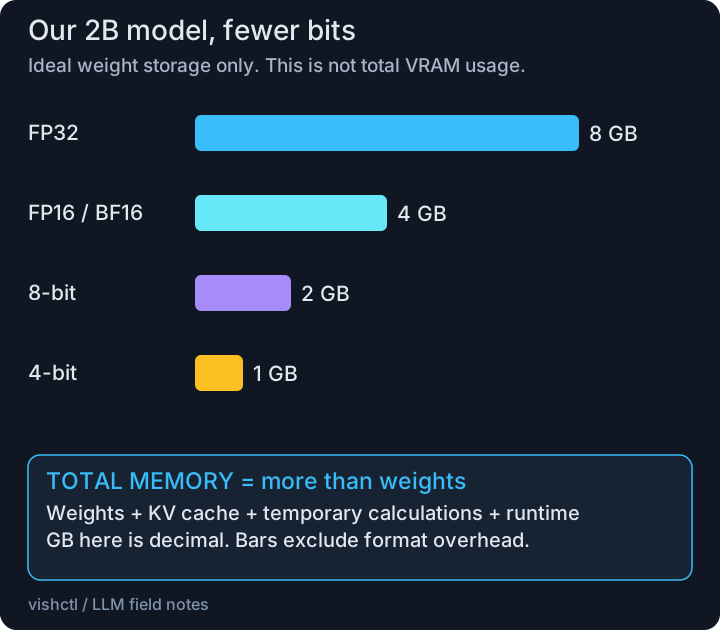
Quantization represents numbers using fewer bits. The chart shows ideal weight storage: parameters multiplied by bits, divided by eight. Actual formats add overhead and may keep some weights at higher precision.
FP16 and BF16 both use 16 bits, with different numerical ranges and precision. FP8 is an 8-bit floating-point format that newer GPUs can run natively. INT4 uses 4-bit integers. AWQ and GPTQ are quantization methods.
For our 2B model, 16-bit weights take about 4 GB; ideal 4-bit storage takes about 1 GB. The question stays the same. We store the learned numbers more compactly, leaving more of our 8 GB GPU for the cache and runtime. Whether it fits depends on the model, format, and context. Quality can fall; speed gains depend on hardware and software.
7. What does vLLM add?#
Our pod question (request A)
            |
            v
     vLLM request queue
            |
            v
 Scheduler chooses work <-------------------+
            |                              |
            v                              |
 Batch of scheduled tokens from A, B, C    |
            |                              |
            v                              |
 GPU runs model using weights + KV cache   |
            |                              |
            v                              |
 Return generated tokens to each user      |
            |                              |
            v                              |
 Finished? -- no: schedule more work -------+
     |
    yes
     |
     v
 Release request resources
vLLM is serving software that runs a model efficiently. Our pod question is request A. Other users send requests B and C. vLLM can process them together while maintaining each request’s own context.
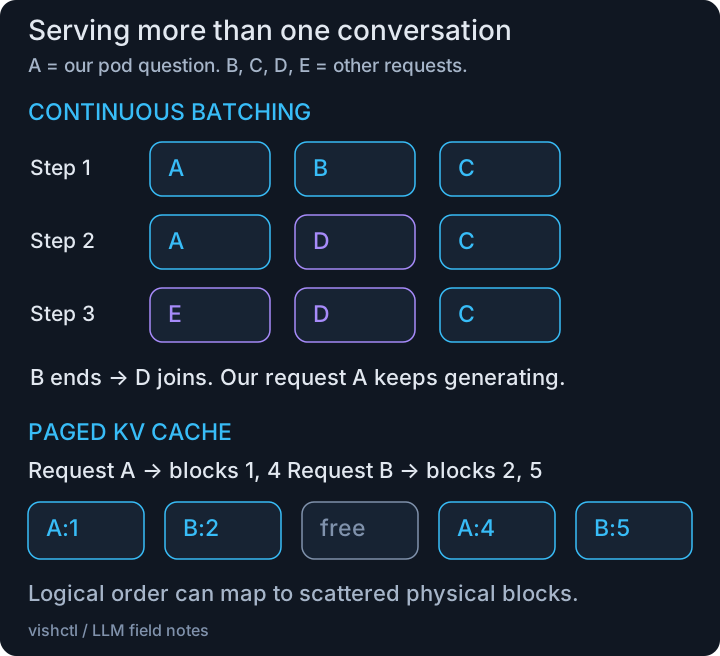
Continuous batching updates the active batch as requests finish and capacity becomes available. PagedAttention manages KV cache in blocks that need not sit together in memory, reducing wasted space. The vLLM team’s explanation connects these ideas to serving more requests.
If B finishes while our restart explanation is still generating, D can join when capacity allows. Our request A continues, with its own KV blocks.
This section goes deeper into multi-GPU serving; skip to the summary if you just want the core model.
8. More GPUs, and fewer active experts#
Split maths, split layers, or serve separate requests#
TENSOR PARALLELISM
One layer's input for our question
             |
       +-----+-----+
       v           v
     GPU 1       GPU 2
    part A      part B
       |           |
       +-----+-----+
             |
       Communicate / combine
             |
         Next layer

PIPELINE PARALLELISM
Our question -> GPU 1 -> GPU 2 -> Output
             early     later
             layers    layers

DATA PARALLELISM FOR SERVING
              Request routing
               /           \
              v             v
        Our question    Other request
              |             |
              v             v
        Model copy 1    Model copy 2
              |             |
              v             v
        Our answer      Their answer
Each replica can itself use multiple GPUs. For example, four GPUs could run two replicas, with two GPUs per replica.
With four GPUs, one choice is TP across all four to run one larger model. Another is four independent replicas of a smaller model behind a load balancer, trading model size for more concurrent capacity. Which is better depends on whether the model fits on fewer GPUs and whether you need size or throughput more.
For the same pod question: TP shares each layer’s calculations across GPUs; PP passes the work through groups of layers; DP sends our whole request to one model replica while another serves someone else. These are possible layouts, not a claim that our small model needs multiple GPUs.
NCCL is NVIDIA’s GPU communication library. It can move and combine data over connections such as PCIe and NVLink. PCIe is the general system interconnect GPUs already use; NVLink is a faster, GPU-to-GPU-only path available on some hardware. More GPU-to-GPU communication generally wants the faster path. Extra GPUs can also add waiting time, so scaling is not automatically a speedup. NVIDIA’s overview describes that communication layer.
How GPU communication connects the pieces#
GPU 1 partial result       GPU 2 partial result
          |                         |
          +------------+------------+
                       |
              Collective operation
                 (for example,
                NCCL AllReduce)
                       |
          +------------+------------+
          v                         v
GPU 1 combined result      GPU 2 combined result

Communication travels over available connections,
such as NVLink or PCIe, depending on the hardware.
MoE routes work to selected experts#
Representation of a token from our question
                       |
                       v
                  Learned router
                       |
               +-------+-------+
               v               v
            Expert 2        Expert 7
               |               |
               +-------+-------+
                       |
                       v
             Combine expert outputs
                       |
                       v
              Continue through layers

Other experts are not selected for this token
in this illustrative MoE layer.
MoE is an alternative architecture, not a serving switch for our dense 2B model. A mixture-of-experts model answering the same question selects a subset of expert networks for each token at an MoE layer. The routing is learned; experts are not necessarily named subject specialists. For a token in our question, a router might select experts 2 and 7. That does not make either a “Kubernetes expert.” Fewer active parameters reduce computation, but all weights still need storage somewhere. Mixtral’s paper provides a concrete example.
Memory capacity answers “Will it fit?” Memory bandwidth answers “How fast can data move?” Compute throughput answers “How fast can the maths run?” Any of these, plus GPU communication, can limit performance.
9. The Big Picture#
The whole conversation flow#
The app supplies the conversation history it wants the model to use. The next turn is another request, with an updated context.
MODEL SETUP                        OUR CONVERSATION
Learned parameters                 Pod question + OOMKilled
       |                                    |
       v                                    v
Choose weight format                 App assembles context
(optional quantization)              instructions + messages
       |                                    |
       v                                    v
Load model on GPU(s)                  Tokenize and schedule
       |                                    |
       +----------------+-------------------+
                        |
                        v
             Prefill through the model
             Build/reuse available KV cache
                        |
                        v
                  First output token
                        |
                        v
             Decode + extend KV cache
             Repeat until stopping
                        |
                        v
             Restart explanation to user
                        |
                        v
           Follow-up: "What should I check?"
                        |
                        v
            App includes relevant history
            plus this follow-up question
                        |
                        v
                  Next request
Cache reuse between requests depends on the engine and matching context. Even without reuse, the app can send the history again and the engine can recompute it.
The five things I want to remember#
| Term | My reminder |
|---|---|
| Parameters | Learned numbers linking patterns such as OOMKilled and memory |
| Tokens | Pieces of our question and restart explanation |
| Attention | Combine the restart question with the OOMKilled clue |
| KV cache | Reuse earlier calculations as the explanation grows |
| Inference engine | Schedule our request and run the model |
Our final answer might be:
The container was killed because of an out-of-memory event. Check its memory limit and usage to investigate why.
One question, learned numbers, context, repeated calculations, and an answer to verify against the cluster.