Temporal lets you write a long-running process as plain Python, and then guarantees it runs to completion, even if the process executing it is killed halfway.
That guarantee is called durable execution. In this post I’ll build a tiny app, deploy it on Kubernetes, and then do the rude thing: delete the worker pods in the middle of a running workflow.
Why Durable Execution Matters#
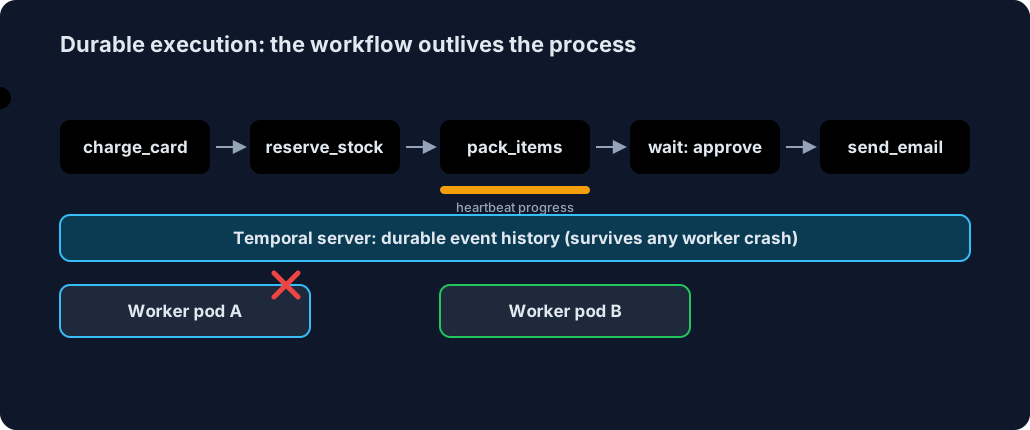
Without it, a multi-step process (charge a card, reserve stock, wait for approval, send an email) needs a pile of glue: a database for state, a queue, retry loops, cron jobs, and recovery code for every crash. With Temporal:
- State survives crashes. Locals and progress live in the server’s event history, not in your process.
- Retries are built in. Failed steps retry with a policy you declare. No hand-rolled loops.
- Waiting is free. A workflow can sleep or wait for a signal for days with zero resources held.
- Everything is visible. Every step is a recorded event you can inspect in the UI.
The Demo#
An order workflow. Two steps misbehave on purpose: send_email fails twice before succeeding, and pack_items is slow, so we have time to kill it.
charge_card -> reserve_stock -> pack_items (slow) -> wait for approve/cancel -> send_email
                                                                    └─ cancel -> refund_card
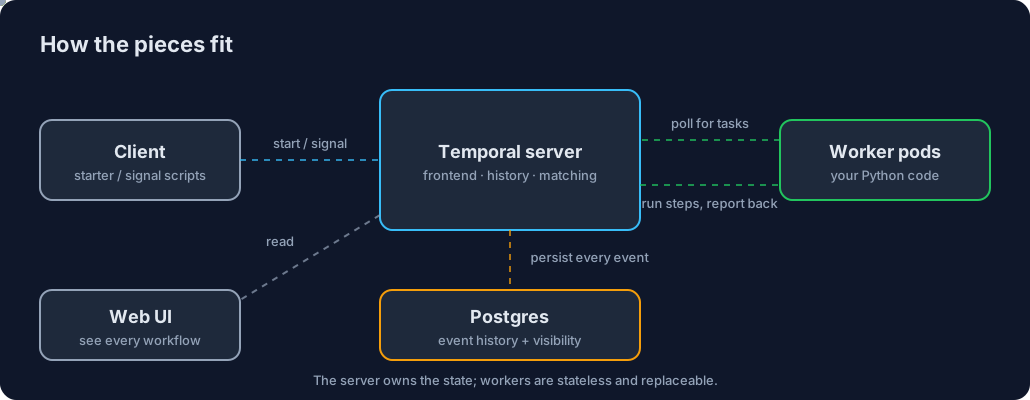
The server owns state. Workers are stateless Python processes that long-poll for work, which is why they can be killed and replaced freely.
The Code#
Two ideas: a workflow (the orchestration, which must be deterministic) and activities (the side-effecting steps).
# app/workflows.py
@workflow.defn
class OrderWorkflow:
    @workflow.signal
    def approve(self) -> None: self.approved = True

    @workflow.signal
    def cancel(self) -> None: self.approved = False

    @workflow.run
    async def run(self, order_id: str) -> str:
        self.approved = None
        await workflow.execute_activity(charge_card, order_id, **OPTS)
        await workflow.execute_activity(reserve_stock, order_id, **OPTS)
        await workflow.execute_activity(
            pack_items, order_id,
            start_to_close_timeout=timedelta(minutes=2),
            heartbeat_timeout=timedelta(seconds=5),   # detect a dead worker fast
        )
        await workflow.wait_condition(lambda: self.approved is not None)  # can wait for days
        if not self.approved:
            await workflow.execute_activity(refund_card, order_id, **OPTS)
            return f"{order_id}: cancelled and refunded"
        await workflow.execute_activity(send_email, order_id, **OPTS)
        return f"{order_id}: completed"
The slow activity reports progress with heartbeats. If its worker dies, the retry reads the last heartbeat and resumes instead of restarting:
# app/activities.py
@activity.defn
async def pack_items(order_id: str) -> str:
    done = activity.info().heartbeat_details          # progress saved by the previous attempt
    start = done[0] + 1 if done else 1
    for step in range(start, 11):
        await asyncio.sleep(2)                        # pretend to pack
        activity.heartbeat(step)                      # save progress to Temporal
    return f"packed:{order_id}(resumed at step {start})"
The worker just registers them and polls a queue:
# app/worker.py
client = await Client.connect(os.getenv("TEMPORAL_ADDRESS", "localhost:7233"))
worker = Worker(client, task_queue="orders", workflows=[OrderWorkflow],
                activities=[charge_card, reserve_stock, pack_items, send_email, refund_card])
await worker.run()
All files: workflows.py, activities.py, worker.py, Dockerfile, worker.yaml.
Try It Locally First#
brew install temporal uv
temporal server start-dev                 # server + Web UI on :8233
uv run python -m app.worker               # in another terminal

temporal workflow start --type OrderWorkflow --task-queue orders \
  --workflow-id order-1 --input '"1"'
temporal workflow signal --workflow-id order-1 --name approve
Open http://localhost:8233 and you’ll see the same UI as below. Now let’s put it on Kubernetes.
Deploy on Kubernetes#
brew install colima docker minikube kubectl helm
colima start --vm-type vz --cpu 4 --memory 8 --disk 40
minikube start --driver=docker --cpus=4 --memory=6g
1. Postgres + Temporal (the Helm chart no longer bundles a database, so a tiny Postgres goes in first; see postgres.yaml and temporal-values.yaml):
kubectl apply -f k8s/postgres.yaml
helm repo add temporal https://go.temporal.io/helm-charts
helm install temporal temporal/temporal -n temporal -f k8s/temporal-values.yaml --timeout 10m
kubectl -n temporal wait --for=condition=available deploy --all --timeout=300s
2. Build and deploy the worker (built inside Minikube’s Docker, so no registry):
eval $(minikube docker-env)
docker build -t order-worker:v2 .
kubectl apply -f k8s/worker.yaml          # 2 replicas
3. Reach it from your laptop:
kubectl -n temporal port-forward svc/temporal-frontend 7233:7233 &
kubectl -n temporal port-forward svc/temporal-web 8080:8080 &
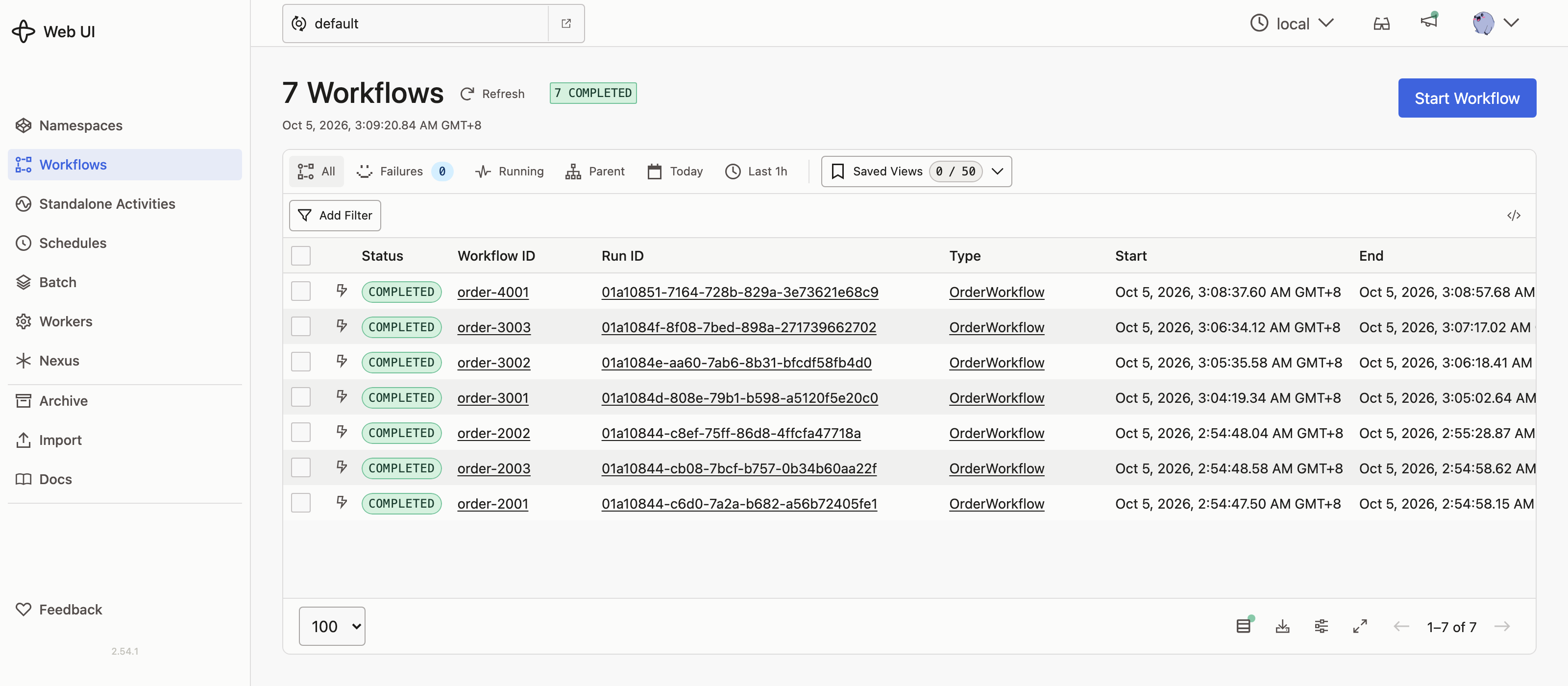
You now have Temporal’s services, your two worker pods and the UI at http://localhost:8080:
The Crash Test#
Start an order, and while pack_items is mid-run, delete every worker pod:
temporal workflow start --type OrderWorkflow --task-queue orders \
  --workflow-id order-3003 --input '"3003"'

kubectl -n temporal delete pod -l app=order-worker --grace-period=0 --force
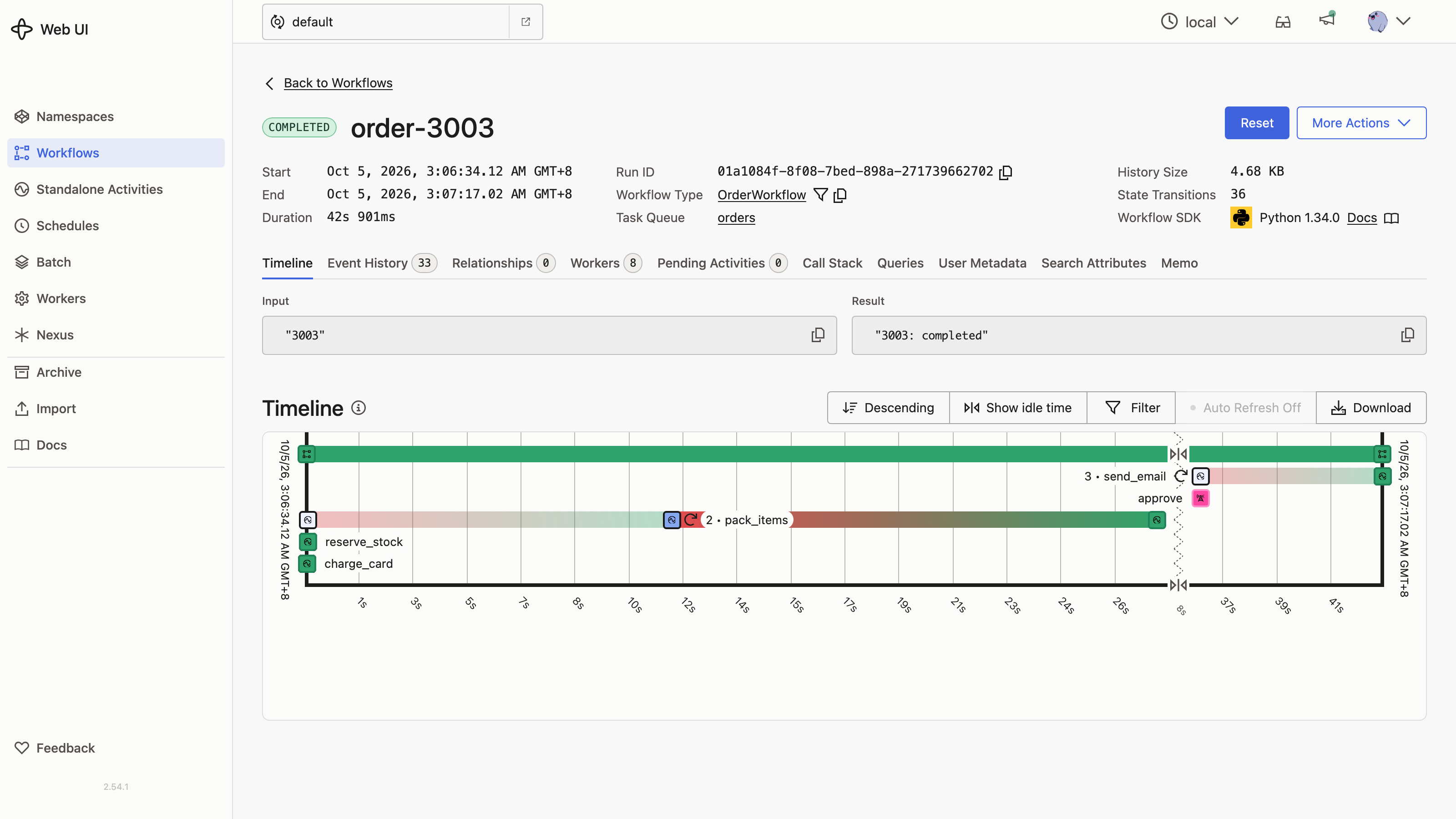
Here it is live, captured from the Web UI:
Then approve it:
temporal workflow signal --workflow-id order-3003 --name approve
3003: completed
What actually happened#
The timeline shows pack_items marked 2 (second attempt) and send_email marked 3, the failures that Temporal retried for us:
And the event history has the receipts: the second attempt ran on a different pod, and it resumed at step 3 from the saved heartbeat, not step 1:
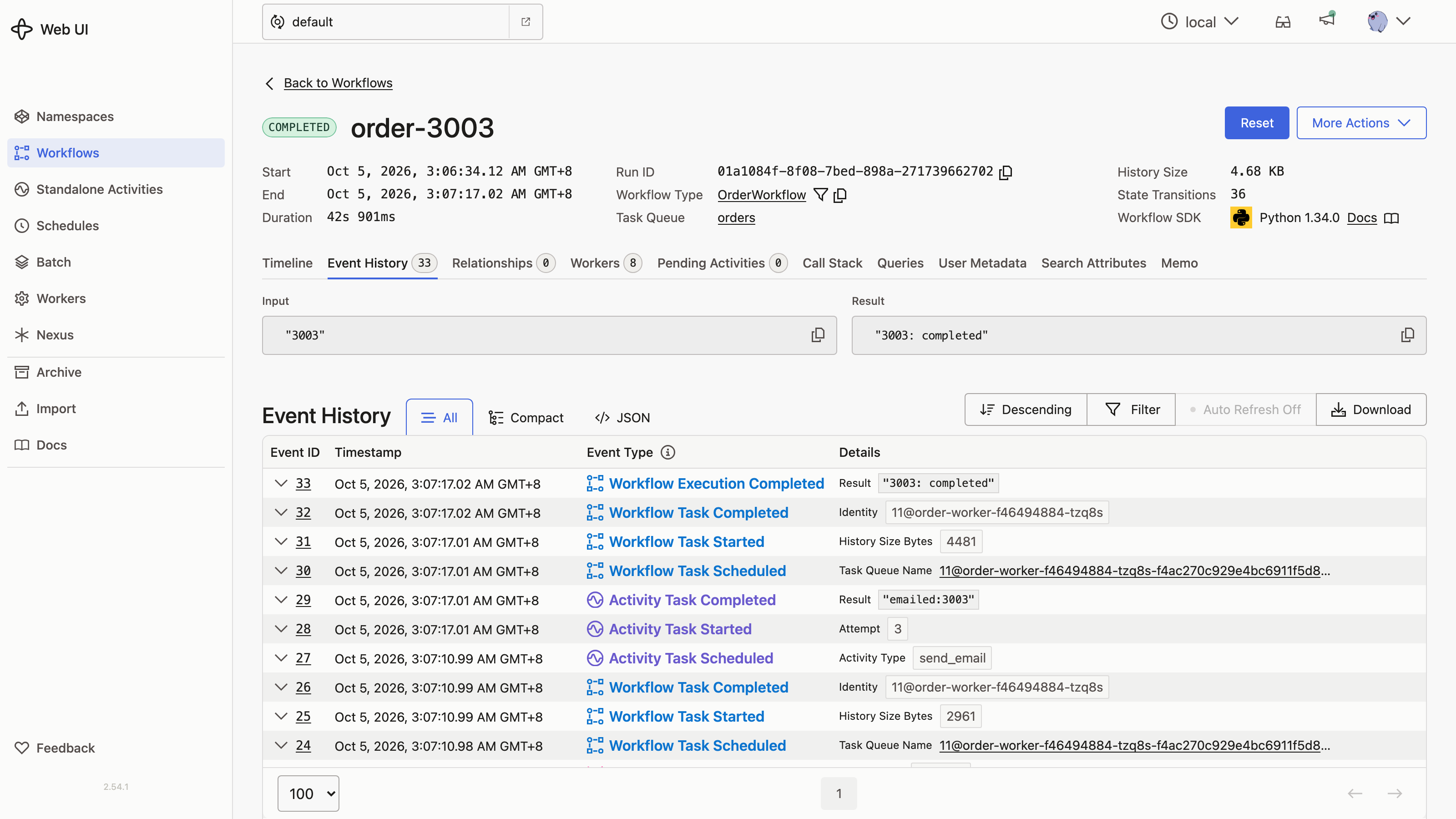
The sequence:
- Worker A dies mid-
pack_items. It stops heartbeating. - After the 5s heartbeat timeout, the server schedules the activity again.
- Worker B (a new pod) picks it up and reads the last heartbeat from the server.
- It resumes at step 3, finishes, and the workflow moves on to wait for the approval signal.
Nothing in the app handled any of this: no recovery code, no state table, no queue. We wrote an ordinary for loop.
When to Reach for Temporal#
- Multi-step business processes: payments, onboarding, order fulfilment, sagas with compensation (
refund_cardabove) - Anything that waits on humans or timers: approvals, reminders, trial expirations
- Long-running jobs and pipelines where “start over” is expensive
- Replacing cron-plus-database-plus-queue glue code
Skip it for simple request/response calls or a one-shot background task that is cheap to rerun.
Caveats#
- This setup is for learning. Production needs a real database with backups, more replicas and shards, TLS and auth on the UI. The Postgres here uses
emptyDir, so deleting its pod wipes all history. - Workflow code must be deterministic (no random numbers, clock reads or I/O); put those in activities.
- To skip hosting the server, Temporal Cloud runs it for you and you only run workers.
Cleanup#
pkill -f "kubectl.*port-forward"
minikube delete && colima stop
Cheat sheet#
Durable execution = the workflow runs to completion even if its process is killed
Workflow          = the orchestration code; must be deterministic
Activity          = a side-effecting step (charge, email, pack); retried by policy
Worker            = a stateless process that long-polls a task queue and runs your code
Event history     = the server-side record of every step; this is where state lives
Heartbeat         = progress an activity reports, so a retry resumes instead of restarting
Heartbeat timeout = how long the server waits before rescheduling a silent activity
Signal            = an outside message a workflow can wait on, such as an approval
Determinism rule  = no random numbers, clock reads, or I/O in workflow code
Good fit          = multi-step processes, human approvals, long jobs, cron-and-queue glue
Poor fit          = simple request/response calls or cheap one-shot tasks
Related posts: more hands-on Kubernetes labs in What Is Karmada? and the laptop GPU simulation lab.