
Old way  = a ticket, then someone images and joins the servers
This way = one object; the Platform claims, images and joins them
A GPU cloud sells a Kubernetes cluster per customer, not a namespace. Each customer wants their own API server, their own nodes and their own GPUs, and they want it in minutes.
In this post I run that flow end to end on a lab VM: one YAML file, vCluster Platform asks Metal3 for two bare-metal servers, Ubuntu is written to their disks, and a brand new tenant cluster schedules a pod onto the GPU node. Every output below is copied from the run on November 1, 2026.
If vCluster is new to you, start with what vCluster is and how private nodes and Auto Nodes work.
The servers and GPUs are simulated. The provisioning flow (Redfish power control, PXE, Ironic writing the image, kubeadm join) is the real one.
The result first#
Time after kubectl apply | What happened |
|---|---|
| +30 s | Tenant control plane is Ready. The API exists before any node does. |
| +41 s | Two NodeClaims created, both servers start provisioning |
| about +4 min 45 s | Both servers provisioned (Ubuntu written, rebooted) |
| +5 min 26 s | GPU node bare-metal-2 is Ready in the tenant |
| +6 min 10 s | CPU node bare-metal-1 is Ready in the tenant |
| +11 min | Fake GPU operator installed, a 1 GPU pod lands on the GPU node, a 5 GPU pod stays Pending |
Most of the six minutes is writing an OS image to disk. A real server would spend the same time there. A second, identical run a few minutes later had both claims Available at +5 min 11 s.
What vCluster private nodes are#
Plain vCluster runs a tenant’s control plane as a pod and shares the host cluster’s nodes. Tenant pods are synced down and run next to everyone else’s.
Private nodes change that: the tenant gets its own real machines, each with its own kubelet, CNI and container runtime, joined straight to the tenant’s API server. Auto nodes add the last piece: nobody joins those machines by hand, the Platform orders them from a node provider.
control plane pod"] --> S3["Host nodes
A and B pods mixed"] S2["Tenant B
control plane pod"] --> S3 end subgraph PRIVATE["Private nodes"] direction LR P1["Tenant A
control plane pod"] p1@--> P2["Server 1
only tenant A"] P1 p2@--> P3["Server 2
only tenant A"] end SHARED ~~~ PRIVATE p1@{ animate: true } p2@{ animate: true } classDef cp fill:#281d48,stroke:#a78bfa,color:#f1edff,stroke-width:2px; classDef node fill:#173f59,stroke:#22d3ee,color:#ecfeff,stroke-width:2px; classDef mixed fill:#302410,stroke:#fbbf24,color:#fff3cf,stroke-width:2px; class S1,S2,P1 cp; class P2,P3 node; class S3 mixed;
For GPUs this matters: a GPU node is a whole machine with drivers, device plugins and a fabric. You want it to belong to one customer.
The lab in one picture#
Everything runs on one Ubuntu VM. That VM runs a Kubernetes cluster inside Docker (vind: vCluster in Docker). Inside that cluster:
- vCluster Platform 4.12.2, the control tower that creates tenants and hands out nodes.
- KubeVirt VMs that play the role of two physical servers.
- A small BMC pod per server that speaks Redfish, so Metal3 can power it on and off like a real server.
- Metal3 (with Ironic) and a DHCP proxy that network boot the servers and write Ubuntu to their disks.
- A bridge network
br0(192.168.100.0/24) that stands in for the rack network.
Ubuntu, Docker"] --> HOST["Host cluster
bare-metal-fun"] HOST --> PLAT["vCluster Platform
4.12.2"] HOST --> M3["Metal3 plus Ironic
DHCP proxy"] HOST --> BMC["BMC pods
Redfish"] HOST --> KV["KubeVirt VMs
bare-metal-1, bare-metal-2"] M3 e1@--> BMC BMC e2@--> KV PLAT e3@--> M3 KV --- BR["br0 rack network
192.168.100.0/24"] e1@{ animate: true } e2@{ animate: true } e3@{ animate: true } classDef plat fill:#281d48,stroke:#a78bfa,color:#f1edff,stroke-width:2px; classDef srv fill:#173f59,stroke:#22d3ee,color:#ecfeff,stroke-width:2px; classDef prov fill:#302410,stroke:#fbbf24,color:#fff3cf,stroke-width:2px; classDef base fill:#13264a,stroke:#38bdf8,color:#e6f6ff,stroke-width:2px; class PLAT plat; class KV,BR srv; class M3,BMC prov; class VM,HOST base;
The host cluster is a single Docker container plus a load balancer for the Platform:
$ docker ps --format "table {{.Names}}\t{{.Image}}\t{{.Status}}"
NAMES                                               IMAGE                          STATUS
vcluster.lb.bare-metal-fun.loft.vcluster-platform   haproxy:3.3-alpine             Up 3 weeks
vcluster.cp.bare-metal-fun                          ghcr.io/loft-sh/vm-container   Up 3 weeks

$ kubectl get nodes -o wide
NAME             STATUS   ROLES                  AGE   VERSION   INTERNAL-IP   ...
bare-metal-fun   Ready    control-plane,master   23d   v1.36.5   172.18.0.2    ...
Next to the Metal3 pod sit the BMC pods and the DHCP proxy. The virt-launcher pods are the servers themselves, and they only exist while a server is powered on:
$ kubectl get pods -n default
NAME                               READY   STATUS    AGE
bare-metal-1-virtbmc-0             2/2     Running   23d
bare-metal-2-virtbmc-0             2/2     Running   23d
dhcp-proxy-0                       1/1     Running   23d
kube-multus-ds-x9dps               1/1     Running   23d
metal3-0                           4/4     Running   23d
virt-launcher-bare-metal-1-jfpzp   2/2     Running   9m16s
virt-launcher-bare-metal-2-gldhw   2/2     Running   9m13s
Before: what the Platform already knows#
Three objects teach the Platform where nodes come from. This is built once and shared by every tenant. (The lab also has a second, unrelated provider; I trimmed it from the outputs below.)
| Object | Question it answers | In this lab |
|---|---|---|
NodeProvider | Where do machines come from? | metal3 (bare metal) |
NodeType | What can a tenant order? | gpu-server and cpu-server, one of each |
BareMetalHost | Which physical servers exist? | bare-metal-1 (role=cpu), bare-metal-2 (role=gpu) |
$ kubectl get nodeproviders.management.loft.sh
NAME      CREATED AT
metal3    2026-10-08T21:39:44Z

$ kubectl get nodetypes.management.loft.sh
NAME                     TOTAL   CLAIMED   PROVIDER   COST   PHASE       CREATED AT
metal3.cpu-server        1       0         metal3     0      Available   2026-10-26T09:42:54Z
metal3.gpu-server        1       0         metal3     0      Available   2026-10-26T09:42:54Z

$ kubectl get bmh -A --show-labels
NAMESPACE   NAME           STATE       ONLINE   AGE   LABELS
default     bare-metal-1   available   false    23d   ...,role=cpu
default     bare-metal-2   available   false    23d   ...,role=gpu

$ kubectl get vm -n default
NAME           AGE   STATUS    READY
bare-metal-1   23d   Stopped   False
bare-metal-2   23d   Stopped   False

$ kubectl get virtualclusterinstances.management.loft.sh -A
No resources found
available means Metal3 has inspected the server and it is free. Stopped means the machine is powered off. No tenants yet.
The link between a node type and a server is just a label selector in the provider:
nodeTypes:
- name: gpu-server
  bareMetalHosts:
    selector:
      matchLabels:
        role: gpu
- name: cpu-server
  bareMetalHosts:
    selector:
      matchLabels:
        role: cpu
node-type gpu-server"] s1@--> NT["NodeType
gpu-server"] NT s2@--> SEL["Selector
role equals gpu"] SEL s3@--> BMH["BareMetalHost
bare-metal-2"] s1@{ animate: true } s2@{ animate: true } s3@{ animate: true } classDef req fill:#13264a,stroke:#38bdf8,color:#e6f6ff,stroke-width:2px; classDef plat fill:#281d48,stroke:#a78bfa,color:#f1edff,stroke-width:2px; classDef srv fill:#173f59,stroke:#22d3ee,color:#ecfeff,stroke-width:2px; class POOL req; class NT,SEL plat; class BMH srv;
In this lab the servers are identical VMs, so the label stands in for hardware discovery. On real hardware you would label by what the server is, for example a GPU model.
The Platform UI shows the same starting point:
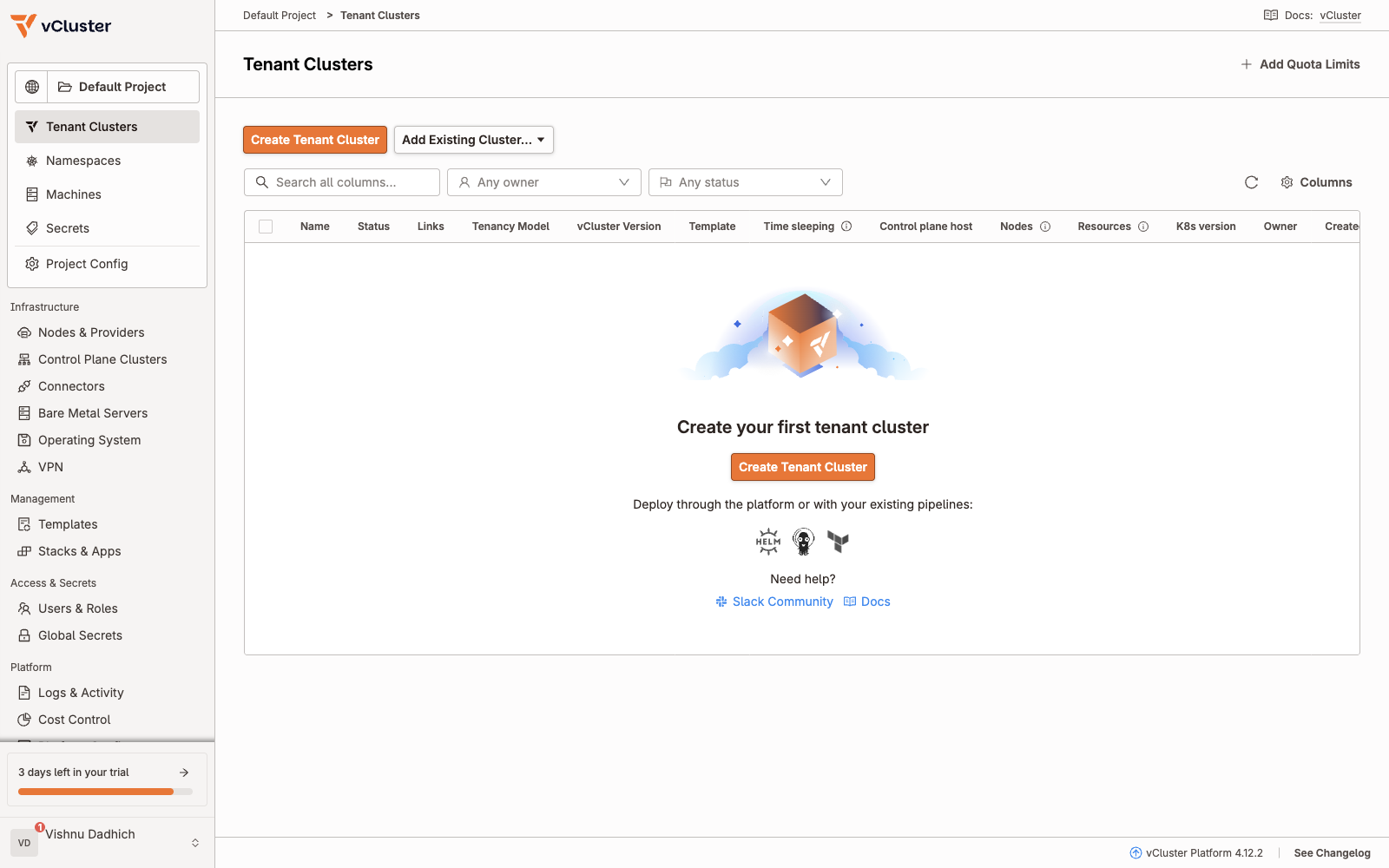
Tenant Clusters: empty. Nothing has been ordered yet.
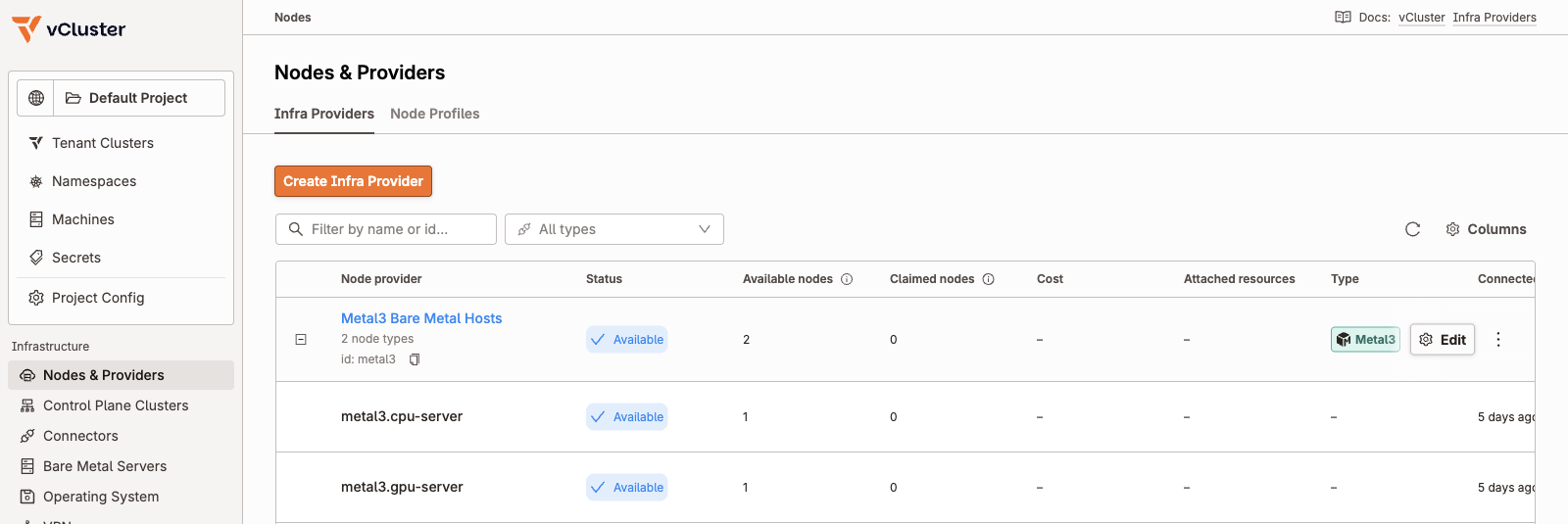
Nodes and Providers: the Metal3 provider offers two node types, each backed by one server.
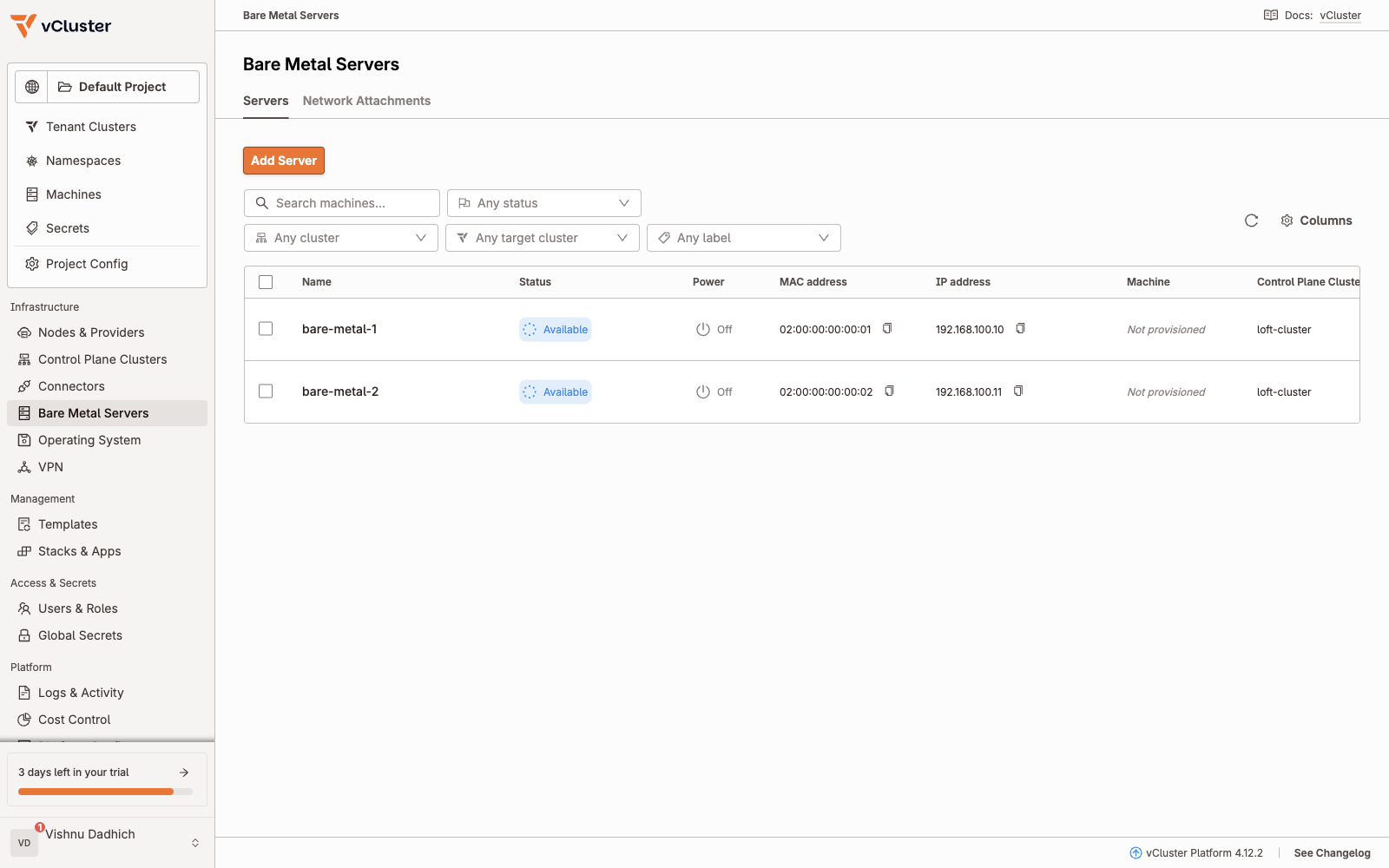
Bare Metal Servers: both Available, power Off, not provisioned.
The request: one YAML file#
This is the whole request for a tenant. It has two parts: a network attachment, and a VirtualClusterInstance holding the vCluster settings.
apiVersion: k8s.cni.cncf.io/v1
kind: NetworkAttachmentDefinition
metadata:
  name: br0-vcluster-one
  namespace: p-default
spec:
  config: |
    { "cniVersion": "0.3.1", "type": "bridge", "bridge": "br0",
      "isDefaultGateway": false, "ipam": {} }
---
apiVersion: management.loft.sh/v1
kind: VirtualClusterInstance
metadata:
  name: one
  namespace: p-default
spec:
  template:
    helmRelease:
      chart:
        version: 0.37.3
      values: |
        controlPlane:
          backingStore:
            etcd:
              embedded:
                enabled: true
          endpoint: 192.168.100.2:8443
          advanced:
            kubeVip:
              enabled: true
              interface: net1
              gateway: 192.168.100.1/24
          statefulSet:
            pods:
              annotations:
                k8s.v1.cni.cncf.io/networks: p-default/br0-vcluster-one
            env:
              - name: VCLUSTER_NODECLAIM_WAIT_TIMEOUT
                value: 1h
        privateNodes:
          enabled: true
          autoNodes:
            - provider: metal3
              static:
                - name: gpu
                  quantity: 1
                  nodeTypeSelector:
                    - property: vcluster.com/node-type
                      value: gpu-server
                  nodeLabels:
                    run.ai/simulated-gpu-node-pool: default
                    workload: gpu
                - name: cpu
                  quantity: 1
                  nodeTypeSelector:
                    - property: vcluster.com/node-type
                      value: cpu-server
                  nodeLabels:
                    workload: cpu
              properties:
                vcluster.com/os-image: ubuntu2404-20260926
    pro:
      enabled: true
  clusterRef:
    cluster: loft-cluster
    namespace: loft-default-v-one
    virtualCluster: one
  owner:
    user: admin
Read it top to bottom:
| Block | What it does |
|---|---|
NetworkAttachmentDefinition | A second network card on br0, the rack network. ipam is empty on purpose. |
backingStore.etcd.embedded | The tenant’s etcd lives inside its own control plane pod. |
endpoint plus kubeVip | Gives the control plane a floating IP 192.168.100.2 on that second card (net1). This is how servers on the rack network reach the tenant API. |
networks annotation | Multus plugs the attachment into the control plane pod. |
NODECLAIM_WAIT_TIMEOUT: 1h | Writing an OS takes minutes, so give the claims time. |
privateNodes.enabled | The tenant gets its own machines. |
autoNodes | Two fixed pools, gpu and cpu, one node each, ordered from the metal3 provider. |
nodeLabels | Applied when the node joins. The fake GPU operator looks for run.ai/simulated-gpu-node-pool. |
os-image | Which Ubuntu image Metal3 writes to disk. |
The networking is the part that usually trips people up. The control plane is a pod inside the host cluster, and the servers are on a different network. kube-vip bridges that gap:
pod one-0"] --> ETH["eth0
pod IP"] end subgraph RACK["br0 rack network"] direction LR NET1["net1 via Multus
kube-vip 192.168.100.2"] k1@--> S1["bare-metal-2
192.168.100.11"] NET1 k2@--> S2["bare-metal-1
192.168.100.10"] end HOSTNET ~~~ RACK k1@{ animate: true } k2@{ animate: true } classDef cp fill:#281d48,stroke:#a78bfa,color:#f1edff,stroke-width:2px; classDef srv fill:#173f59,stroke:#22d3ee,color:#ecfeff,stroke-width:2px; classDef idle fill:#101e27,stroke:#324950,color:#8aa0a8; class CP,NET1 cp; class S1,S2 srv; class ETH idle;
Apply it and watch#
$ date -u +"start: %H:%M:%S UTC"; make create-vcluster
start: 06:05:19 UTC
kubectl apply -f manifests/vcluster.yaml
networkattachmentdefinition.k8s.cni.cncf.io/br0-vcluster-one created
virtualclusterinstance.management.loft.sh/one created
A loop printed the tenant, its node claims and the servers every 10 seconds. Here are the moments that changed something:
06:05:25  VCI one created
06:06:09  one-cqhsw   Pending     metal3.gpu-server
          one-r8zq6   Pending     metal3.cpu-server
          bare-metal-1   provisioning   true
          bare-metal-2   provisioning   true
06:10:04  bare-metal-1   provisioned    true
          bare-metal-2   provisioned    true
06:10:37  one-cqhsw   Available   metal3.gpu-server
06:11:21  one-r8zq6   Available   metal3.cpu-server
The same moment in the Platform UI (these two shots are from a second, identical run a few minutes later, so the claim names differ):
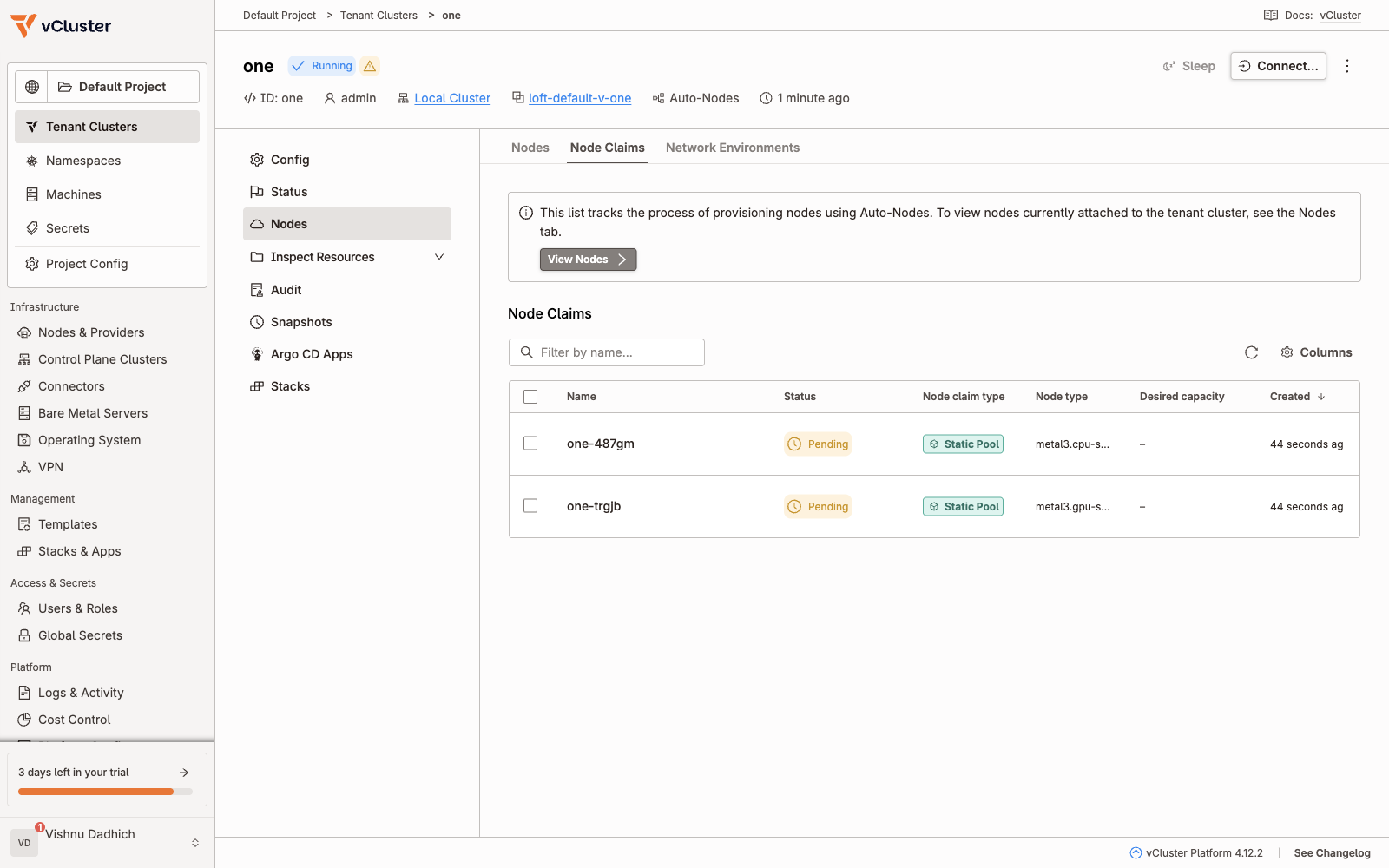
About 44 seconds in: the tenant is Running and its two node claims are Pending.
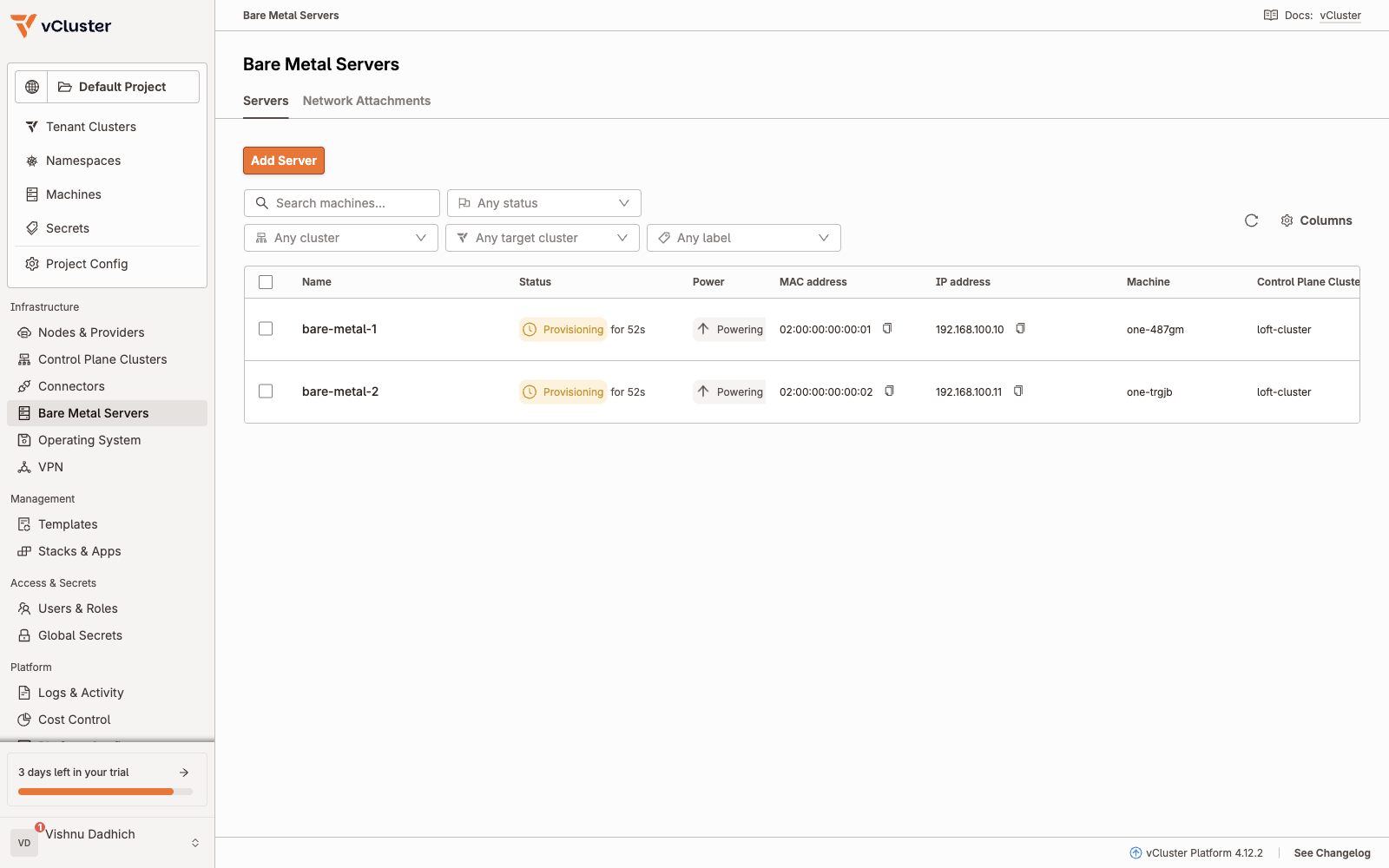
Metal3 has powered both servers on and is provisioning them.
What is happening behind those states:
If you watch the host’s pods during this, the BMC and virt-launcher pods are created, deleted and created again. That is the reboot: first into the ramdisk that writes the image, then into the freshly written disk.
The Platform keeps a timestamp for each condition, which gives exact numbers:
VirtualClusterDeployed   True   06:05:21Z
VirtualClusterOnline     True   06:05:48Z
VirtualClusterReady      True   06:05:50Z
NodesProvisioned         True   06:11:20Z
bare-metal-2   created 06:10:29Z   Ready since 06:10:46Z
bare-metal-1   created 06:11:20Z   Ready since 06:11:30Z
0 s"] t1@--> B["Control plane Ready
+30 s"] B t2@--> C["Claims and power on
+41 s"] C t3@--> D["Ubuntu written
about +4 min 45 s"] D t4@--> E["GPU node Ready
+5 min 26 s"] E t5@--> F["CPU node Ready
+6 min 10 s"] t1@{ animate: true } t2@{ animate: true } t3@{ animate: true } t4@{ animate: true } t5@{ animate: true } classDef fast fill:#173f59,stroke:#22d3ee,color:#ecfeff,stroke-width:2px; classDef slow fill:#302410,stroke:#fbbf24,color:#fff3cf,stroke-width:2px; class A,B,C,E,F fast; class D slow;
Final state on the host:
$ kubectl get virtualclusterinstances.management.loft.sh -A -o custom-columns=NAME:.metadata.name,PHASE:.status.phase
NAME   PHASE
one    Ready

$ kubectl get nodeclaims.management.loft.sh -A
NAMESPACE   NAME        STATUS      VCLUSTER   TYPE                CREATED AT
p-default   one-cqhsw   Available   one        metal3.gpu-server   2026-11-01T06:06:01Z
p-default   one-r8zq6   Available   one        metal3.cpu-server   2026-11-01T06:06:01Z

$ kubectl get bmh -A
NAMESPACE   NAME           STATE         ONLINE   AGE
default     bare-metal-1   provisioned   true     23d
default     bare-metal-2   provisioned   true     23d
And in the UI:
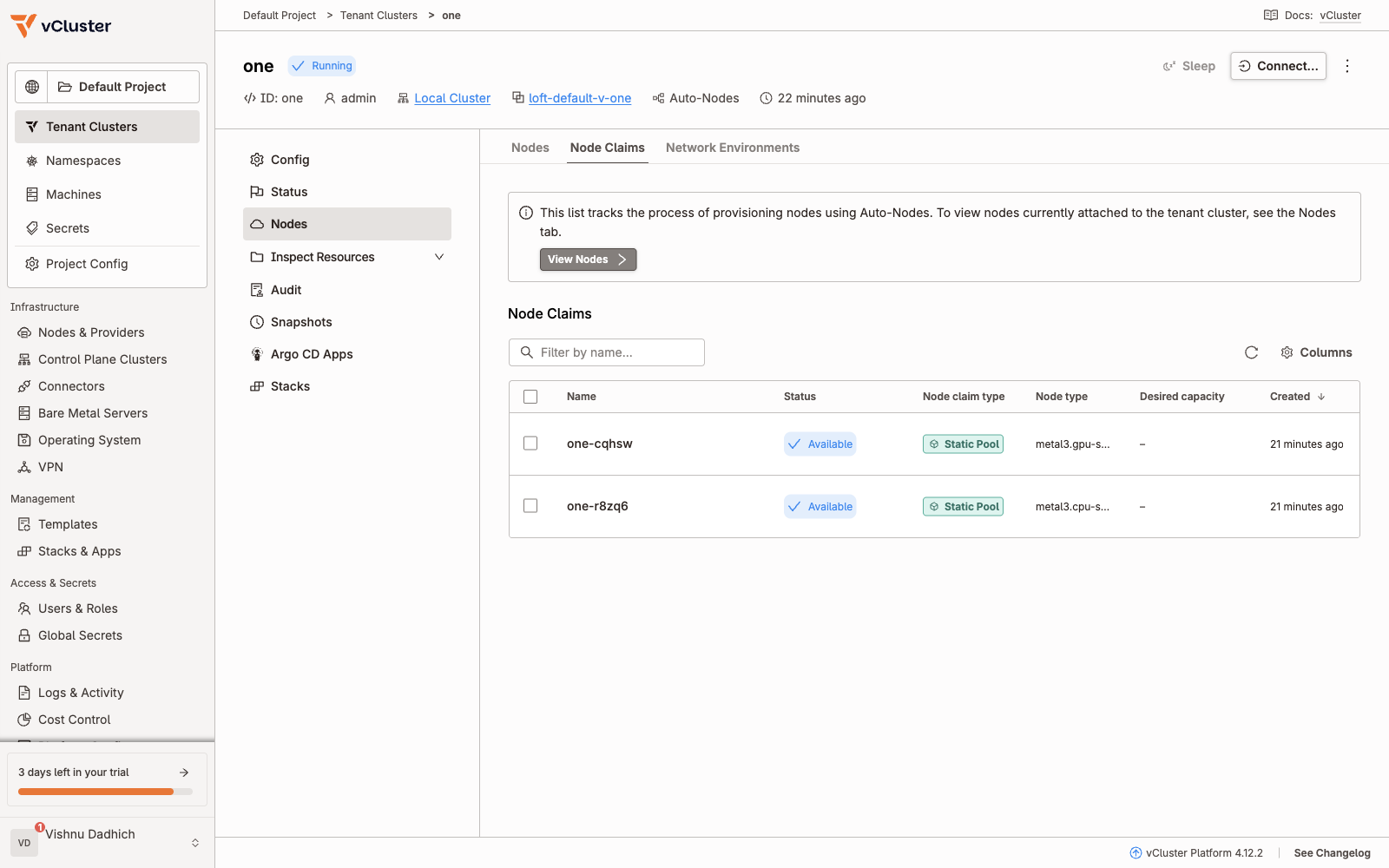
Both claims Available.
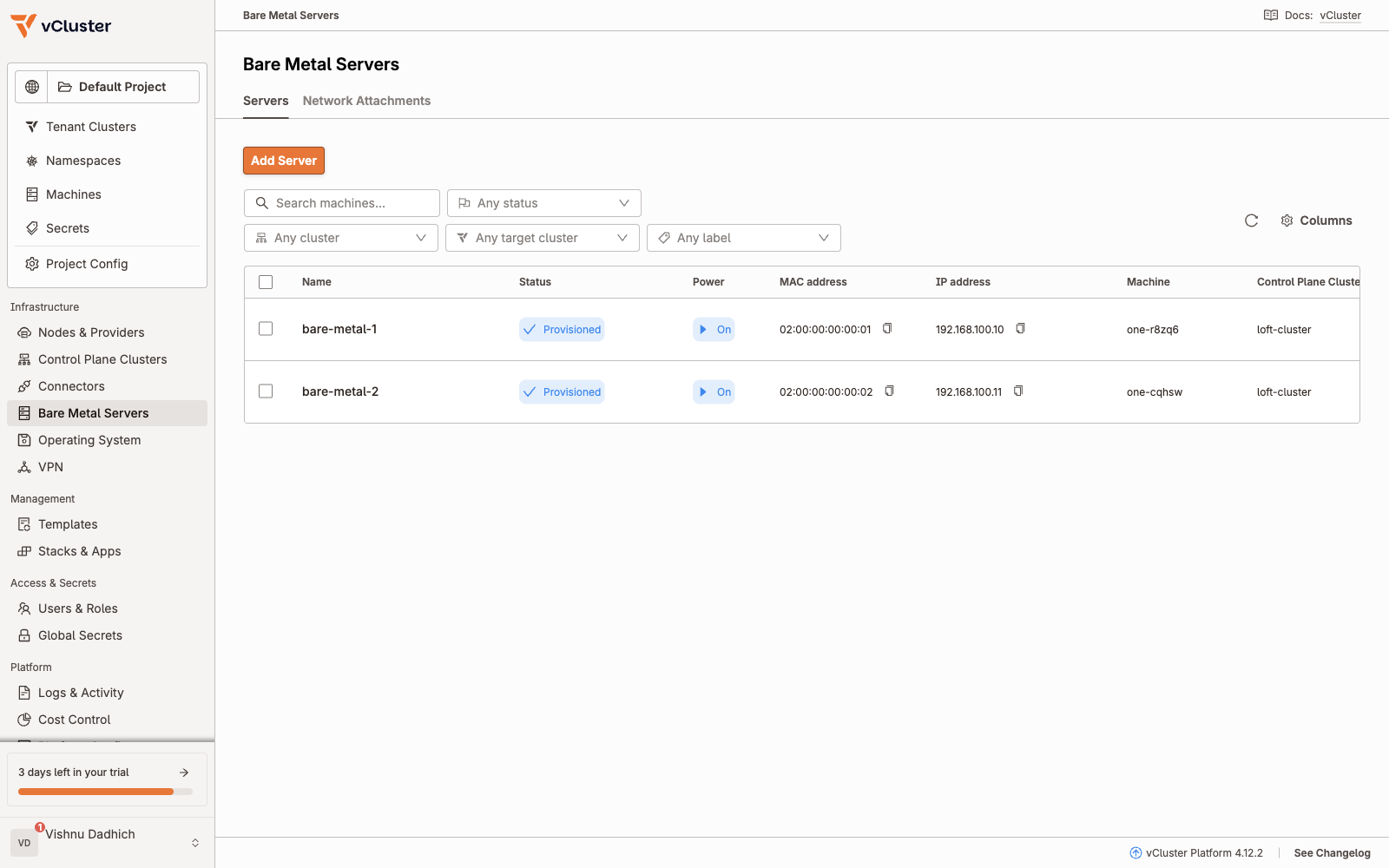
Both servers Provisioned and On, each bound to a tenant machine.
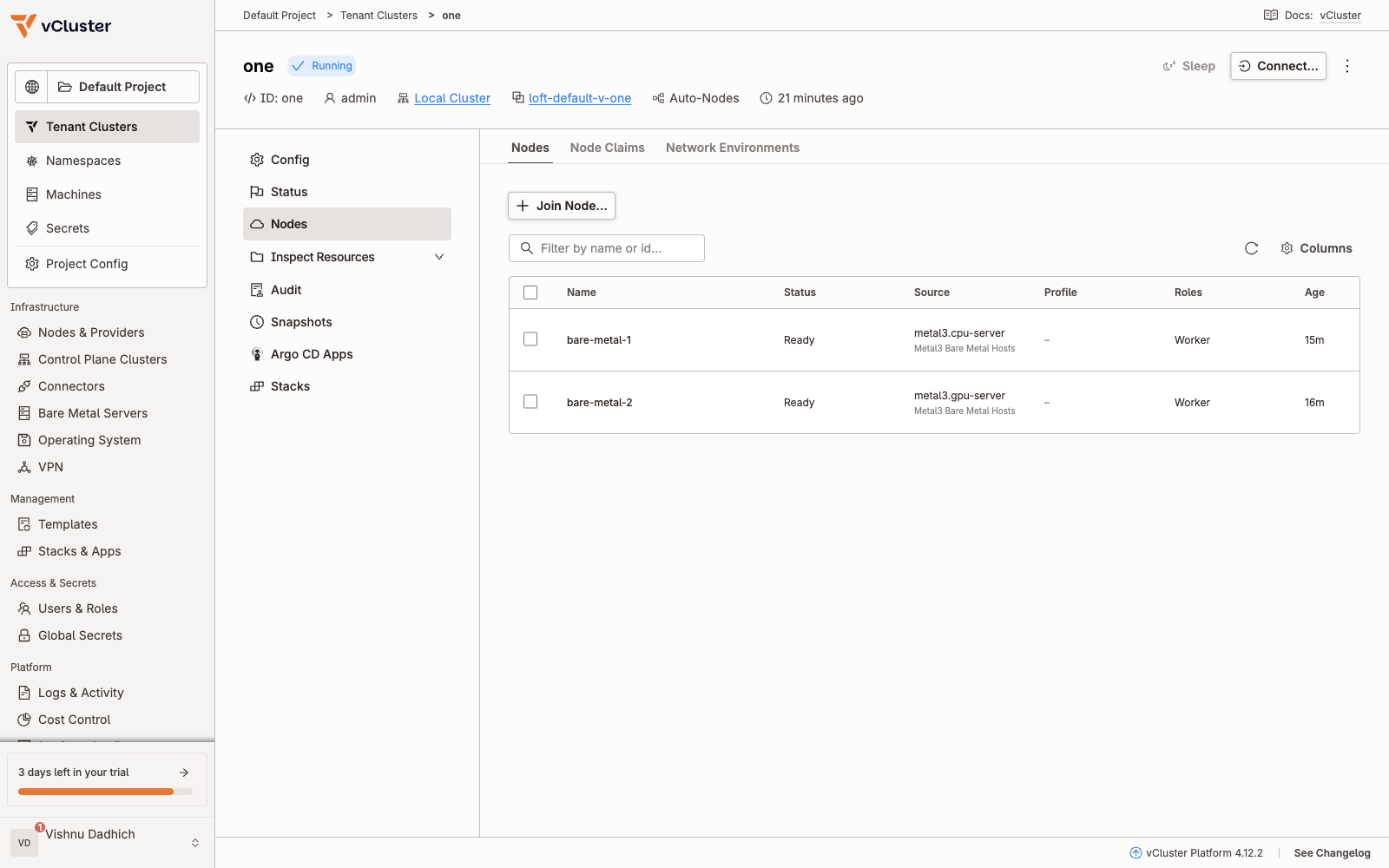
Tenant one: two Ready worker nodes, each traced back to the node type that supplied it.
Inside the tenant#
The tenant’s kubeconfig is a secret in its host namespace. The API lives inside the host cluster, so I forward a local port to it:
kubectl --kubeconfig ~/sandbox/kubeconfig get secret vc-one -n loft-default-v-one \
  -o jsonpath='{.data.config}' | base64 -d \
  | sed 's#server: .*#server: https://127.0.0.1:18443#' > ~/tenant-one.kubeconfig

nohup kubectl --kubeconfig ~/sandbox/kubeconfig port-forward -n loft-default-v-one \
  svc/one 18443:443 --address 127.0.0.1 >~/pf.log 2>&1 &

export KUBECONFIG=~/tenant-one.kubeconfig
$ kubectl get nodes -o wide -L run.ai/simulated-gpu-node-pool,workload
NAME           STATUS   AGE    VERSION   INTERNAL-IP      OS-IMAGE             KERNEL-VERSION      SIMULATED-GPU-NODE-POOL   WORKLOAD
bare-metal-1   Ready    55s    v1.36.0   192.168.100.10   Ubuntu 24.04.5 LTS   6.8.0-142-generic                             cpu
bare-metal-2   Ready    106s   v1.36.0   192.168.100.11   Ubuntu 24.04.5 LTS   6.8.0-142-generic   default                   gpu
Compare that with the host: the host node runs kernel 7.0.0-30 and is called bare-metal-fun. These two nodes run the freshly written Ubuntu with kernel 6.8.0-142. They are different machines.
The tenant is a clean cluster with its own system pods:
$ kubectl get pods -A
NAMESPACE            NAME                                      READY   STATUS    AGE
kube-flannel         kube-flannel-ds-b8r96                     1/1     Running   111s
kube-flannel         kube-flannel-ds-tdflh                     1/1     Running   2m42s
kube-system          coredns-df8c87f55-zfdpp                   1/1     Running   7m23s
kube-system          konnectivity-agent-599bbdf4c8-ndb7w       1/1     Running   7m22s
kube-system          kube-proxy-lqdwd                          1/1     Running   2m43s
kube-system          kube-proxy-wjsls                          1/1     Running   112s
local-path-storage   local-path-provisioner-6d484fd799-zv66r   1/1     Running   7m22s
And on the host, the tenant’s namespace holds exactly one pod, the control plane:
$ kubectl get pods -n loft-default-v-one
NAME    READY   STATUS    RESTARTS   AGE
one-0   1/1     Running   0          7m56s
API, etcd, controllers"] end subgraph T["Tenant one nodes"] direction LR G["bare-metal-2
workload gpu"] ~~~ C["bare-metal-1
workload cpu"] end CP w1@--> G CP w2@--> C w1@{ animate: true } w2@{ animate: true } classDef plat fill:#281d48,stroke:#a78bfa,color:#f1edff,stroke-width:2px; classDef gpu fill:#173f59,stroke:#22d3ee,color:#ecfeff,stroke-width:2px; classDef cpu fill:#13264a,stroke:#38bdf8,color:#e6f6ff,stroke-width:2px; class PL,CP plat; class G gpu; class C cpu;
Give the GPU node some GPUs#
There is no real GPU in this lab, so I install Run:ai’s fake GPU operator inside the tenant. It only targets nodes labelled run.ai/simulated-gpu-node-pool=default, which the gpu pool set at join time.
# gpu/gpu-values.yaml
topology:
  nodePools:
    default:
      gpuProduct: Tesla-K80
      gpuCount: 4
      gpuMemory: 11441
$ make install-gpu-operator
helm --kubeconfig ~/tenant-one.kubeconfig upgrade --install gpu-operator \
  oci://ghcr.io/run-ai/fake-gpu-operator/fake-gpu-operator \
  --version 0.0.72 --namespace gpu-operator -f gpu/gpu-values.yaml --wait --timeout 5m
Release "gpu-operator" does not exist. Installing it now.
STATUS: deployed

$ kubectl get nodes -o custom-columns='NAME:.metadata.name,GPU:.status.allocatable.nvidia\.com/gpu'
NAME           GPU
bare-metal-1   <none>
bare-metal-2   4
The device plugin only landed on the labelled node:
$ kubectl get pods -n gpu-operator -o wide
NAME                                        READY   STATUS    NODE
computedomain-controller-59f965747d-q6ttl   1/1     Running   bare-metal-1
device-plugin-cxd5w                         1/1     Running   bare-metal-2
kwok-gpu-device-plugin-596cd78494-9lz9n     1/1     Running   bare-metal-1
nvidia-dcgm-exporter-kwok-db645795f-k9r7h   1/1     Running   bare-metal-1
nvidia-dcgm-exporter-m4rr4                  1/1     Running   bare-metal-2
status-updater-f447d96d9-cccwt              1/1     Running   bare-metal-2
topology-server-56cd64dbcf-5dbwh            1/1     Running   bare-metal-1
Prove the scheduling#
Four test pods:
| Pod | Asks for | Expected |
|---|---|---|
gpu-ok | 1 GPU | Runs on the GPU node |
gpu-smi | 1 GPU, runs nvidia-smi | Completes on the GPU node |
cpu-only | no GPU, workload: cpu | Runs on the CPU node |
gpu-too-big | 5 GPUs | Stays Pending, only 4 exist |
$ kubectl apply -f ~/sandbox/gpu/gpu-test-pods.yaml
pod/gpu-ok created
pod/gpu-too-big created
pod/cpu-only created
pod/gpu-smi created

$ kubectl get pods -o wide
NAME          READY   STATUS      RESTARTS   AGE   IP           NODE
cpu-only      1/1     Running     0          15s   10.244.1.6   bare-metal-1
gpu-ok        1/1     Running     0          15s   10.244.0.8   bare-metal-2
gpu-smi       0/1     Completed   0          15s   10.244.0.9   bare-metal-2
gpu-too-big   0/1     Pending     0          15s   <none>       <none>
$ kubectl logs gpu-smi
+------------------------------------------------------------------------------+
| NVIDIA-SMI 470.129.06   Driver Version: 470.129.06   CUDA Version: 11.4      |
+--------------------------------+----------------------+----------------------+
|   1  Tesla-K80             Off | 00000001:00:00.0 Off |                  Off |
| N/A   33C    P8    11W /  70W  |  11441MiB / 11441MiB |     100%     Default |
+--------------------------------+----------------------+----------------------+

$ kubectl describe pod gpu-too-big | tail -2
  Warning  FailedScheduling  15s   default-scheduler  0/2 nodes are available: 2 Insufficient nvidia.com/gpu. ...
1 GPU"] ~~~ R2["gpu-smi
1 GPU"] ~~~ R3["cpu-only
0 GPU"] ~~~ R4["gpu-too-big
5 GPU"] end subgraph NODES["Tenant nodes"] direction LR G["bare-metal-2
4 GPUs"] ~~~ C["bare-metal-1
0 GPUs"] ~~~ X["Pending
Insufficient GPU"] end R1 g1@--> G R2 g2@--> G R3 g3@--> C R4 -.-> X ASK ~~~ NODES g1@{ animate: true } g2@{ animate: true } g3@{ animate: true } classDef req fill:#13264a,stroke:#38bdf8,color:#e6f6ff,stroke-width:2px; classDef gpu fill:#173f59,stroke:#22d3ee,color:#ecfeff,stroke-width:2px; classDef cpu fill:#101e27,stroke:#324950,color:#8aa0a8; classDef warn fill:#302410,stroke:#fbbf24,color:#fff3cf,stroke-width:2px; class R1,R2,R3,R4 req; class G gpu; class C cpu; class X warn;
The GPUs are simulated, so this shows resource accounting and placement, not performance. If you want the full story on Pending GPU pods, see why a GPU pod stays Pending.
Clean up: servers go back to the pool#
Deleting the tenant releases its servers. The delete took 45 seconds, and both servers were back to available and powered off a few seconds later, ready for the next customer.
$ date -u +"start: %H:%M:%S UTC"; kubectl delete virtualclusterinstances.management.loft.sh one -n p-default; date -u +"done: %H:%M:%S UTC"
start: 06:27:51 UTC
virtualclusterinstance.management.loft.sh "one" deleted from p-default namespace
done: 06:28:36 UTC

$ kubectl get bmh -A
NAMESPACE   NAME           STATE       ONLINE   AGE
default     bare-metal-1   available   false    23d
default     bare-metal-2   available   false    23d

$ kubectl get vm -n default
NAME           AGE   STATUS    READY
bare-metal-1   23d   Stopped   False
bare-metal-2   23d   Stopped   False
powered off"] l1@--> B["provisioning
image written"] B l2@--> C["provisioned
node in tenant"] C l3@--> D["deprovisioning
released, powered off"] D l4@--> A l1@{ animate: true } l2@{ animate: true } l3@{ animate: true } l4@{ animate: true } classDef idle fill:#101e27,stroke:#324950,color:#8aa0a8; classDef busy fill:#302410,stroke:#fbbf24,color:#fff3cf,stroke-width:2px; classDef live fill:#173f59,stroke:#22d3ee,color:#ecfeff,stroke-width:2px; class A idle; class B,D busy; class C live;
One lab gotcha: deleting a tenant also strips three annotations from each BareMetalHost (IP, gateway, DNS) that the DHCP proxy reads. Without them the next tenant’s servers boot with no network. The lab’s make fix-bmh puts them back:
$ make fix-bmh
kubectl annotate bmh bare-metal-1 -n default --overwrite metal3.vcluster.com/ip-address=192.168.100.10/24 metal3.vcluster.com/gateway=192.168.100.1 metal3.vcluster.com/dns-servers=44.128.0.4
baremetalhost.metal3.io/bare-metal-1 annotated
kubectl annotate bmh bare-metal-2 -n default --overwrite metal3.vcluster.com/ip-address=192.168.100.11/24 metal3.vcluster.com/gateway=192.168.100.1 metal3.vcluster.com/dns-servers=44.128.0.4
baremetalhost.metal3.io/bare-metal-2 annotated
What is real and what is simulated#
| Real | Simulated |
|---|---|
| vCluster Platform, private nodes, auto nodes | The servers (KubeVirt VMs) |
| Metal3, Ironic, Redfish power control | The BMCs (a pod per server) |
| DHCP, PXE, writing Ubuntu to disk | The GPUs (fake GPU operator) |
| kubeadm join, kube-vip, Multus, flannel | Hardware discovery (a role label) |
Kubernetes scheduling of nvidia.com/gpu | GPU performance, NVLink, RDMA |
The flow is the one you would run on a real rack. What this lab cannot tell you is how real GPU servers behave: driver install time, fabric topology, firmware, and how you safely wipe a server between customers. That is what a proof of concept on real hardware is for.
Cheat sheet#
vCluster              = a Kubernetes control plane that runs as a pod in a host cluster
vCluster Platform     = the management layer that creates tenants and hands out nodes
Private nodes         = the tenant gets its own machines, not shared host nodes
Auto nodes            = the Platform orders those machines from a node provider
VirtualClusterInstance= the Platform object for one tenant; your portal can create it via API
NodeProvider          = where machines come from (metal3, OpenTofu templates, KubeVirt)
NodeType              = an orderable machine shape, selects servers by label
NodeClaim             = one request for one node; Pending until a server joins
BareMetalHost         = Metal3's record of one physical server and its state
Metal3 / Ironic       = power on via BMC, PXE boot, write the OS image to disk
kube-vip              = floating IP so servers on the rack network reach the tenant API
Multus                = gives the control plane pod a second card on the rack network
fake-gpu-operator     = advertises nvidia.com/gpu on labelled nodes, no hardware needed
Related posts: